批量转换Python2代码到Python3代码的bat脚本
批量转换Python2代码到Python3代码的bat脚本
2o3.bat1
2
3
4
5@echo off
for /r ./ %%i in (*.py) do (
c:\Python27\python.exe c:\Python27\Tools\Scripts\2to3.py -w %%i
echo %%i
)
本站所有文章除特别声明外,均采用 CC BY-NC-SA 4.0 许可协议。转载请注明来源 IT技术记录小站!
相关推荐

2019-07-25
Py爬网页上的代理IP地址
使用Python抓取网页上的IP地址。第一步找一个有IP有网页第二步抓取页面第三步提取IP HTTP GET请求代码123456789101112131415161718192021import httplibimport reimport StringIOimport gzipimport jsondef http_get(host, url, body, header): try: conn = httplib.HTTPConnection(host, None, None, 20) conn.request("GET", url, body, header) res = conn.getresponse() res_str = res.read() encoding = res.getheader('Content-Encoding') conn.close() if encoding == 'gzip': ...

2022-10-19
使Aldous-Broder算法生成多层迷宫
多层迷宫生成Aldous-Broder algorithmThe Aldous-Broder algorithm also produces uniform spanning trees. 1.Pick a random cell as the current cell and mark it as visited.2.While there are unvisited cells: 1.Pick a random neighbour. 2.If the chosen neighbour has not been visited: 1.Remove the wall between the current cell and the chosen neighbour. 2.Mark the chosen neighbour as visited. 3.Make the chosen neighbour the current cell. Aldous-Broder算法Aldous-Broder算法也生成统一的生成树。 1。选择一个随机的单元格作为当...

2022-10-18
python使用argparse解析命令行参数
python使用argparse解析命令行参数python例子123456789101112131415161718192021222324252627282930313233343536373839404142434445464748495051525354555657585960#!/usr/bin/python3# -*- coding: utf-8 -*-import sysimport argparseimport osimport tarfile untar_path = ""out_dir = ""def parse_usage(): parser = argparse.ArgumentParser() parser.add_argument('-o', '--outdir', dest='out dir') parser.add_argument('-i', '--inpath', dest='t...

2021-04-14
深度优先搜索
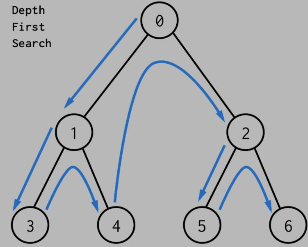
本篇文章禁止转载 (深度优先搜索)算法介绍介绍1。访问起点;2。依次从起点的未被访问的邻点出发,对迷宫进行深度优先遍历;直至迷宫中起点有路径相通的格子被访问或者找到终点; 编程思路 1。访问起点,起点加入路径表。 2。找可到达且未访问的相邻点。 如果有: 1。移动到相邻的点 2。设置相邻点为当前点 3。当前点加入路径 4。判断是否为终点,否继续循环。 没有: 1。从路径列表中删除当前点 2。设置当前点为路径列表中的最后一个点 图示 演示代码12345678910111213141516171819202122232425262728293031323334353637383940414243444546474849505152535455565758596061626364656667686970717273747576777879808182838485868788899091929394959697989910010110210310410510610710810911011111211311411511611711811912012112212312412512612...

2019-08-12
python3编、解码base64小工具
工具界面 需要安装wxPython,安装方法1pip install wxPython base64tool.py1234567891011121314151617181920212223242526272829303132333435363738394041424344454647484950515253545556575859606162636465666768697071727374757677787980818283848586878889#!/usr/bin/python3# -*- coding: utf-8 -*-import wximport base64# 需要安装 wxPythonclass MyApp(wx.Frame): def __init__(self, parent, title): super(MyApp, self).__init__(parent, title=title, size=(640, 480)) panel = wx.Panel(self) vbox = wx.BoxSizer(w...
2019-12-19
python使用getopt解析命令行参数
说明:getopt.getopt(args,shortopts,longopts = []) args是要解析的参数列表(不包括程序启动路径),通常是sys.argv[1:]。shortopts是脚本要识别的选项字母字符串,其中的选项需要一个参数,后接一个冒号。longopts(如果已指定)必须是包含应支持的长选项名称的字符串列表。'--'选项名称中不应包含前导字符。需要参数的长选项应后跟等号('=')。不支持可选参数。要仅接受长选项,shortopts应该为空字符串。 1、命令行参数获取方法使用sys.argvtest.py1234567#!/usr/bin/python3# -*- coding: utf-8 -*-import sysif __name__ == "__main__": for i in range(len(sys.argv)): print(sys.argv[i])执行1python test.py 1 2输出:123test.py12sys.argv第一个是脚本路径,剩下的是命令行参...